How Website Malware Removal and WordPress Malware Removal Protect Your Business Website
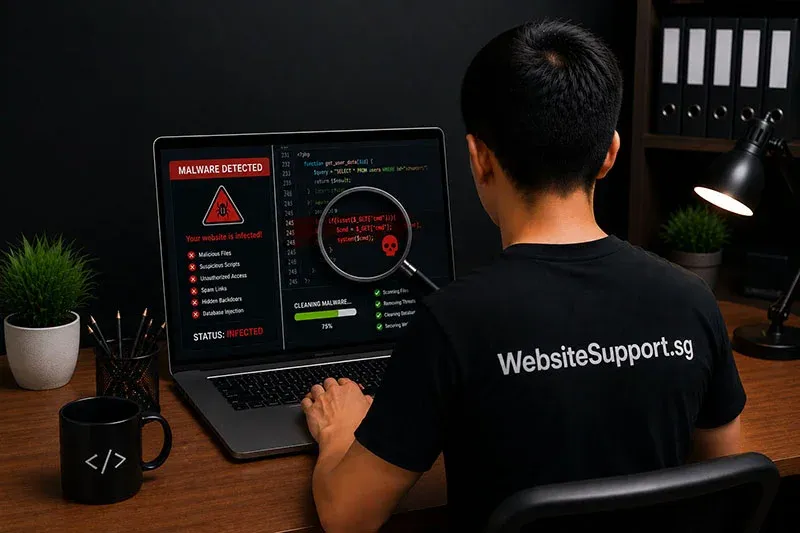
A website plays an important role in building trust, attracting customers and supporting business growth. However, websites can face security threats such as malicious scripts, infected files, suspicious redirects and unauthorised access. These problems can affect website functionality, expose sensitive information and damage your online reputation. Professional Website Malware Removal helps identify and remove malicious code so your website can return to a safer and more reliable condition.
Whether you operate a business website, an online store or a personal blog, understanding website malware and the importance of proper security can help you protect your online presence.
1. What Is Website Malware?
Malware is malicious software or code designed to harm a website, gain unauthorised access, collect information or perform unwanted activities.
It can enter a website through vulnerable plugins, outdated software, compromised passwords, insecure hosting environments or infected files.
Once malware affects a website, it may operate without immediately showing visible signs. In some cases, visitors may notice suspicious redirects, unusual pop-ups or browser security warnings. Other infections may remain hidden while malicious scripts operate in the background.
Identifying these issues early is important because an infected website can affect both visitors and business operations.
2. Common Signs Your Website May Be Infected
Website malware does not always produce obvious symptoms. However, several warning signs may indicate a possible security problem.
Look out for:
- Unexpected redirects to unfamiliar websites
- Suspicious pop-ups or advertisements
- Unrecognised files or administrator accounts
- Website pages displaying unusual content
- Browser warnings about unsafe websites
- Unexpected changes to website files
- Unusual server activity or performance problems
- Search engine warnings or security notifications
These symptoms do not always confirm a malware infection. Technical errors, compromised accounts and server configuration problems can sometimes produce similar behaviour.
If you notice unusual activity, investigate the website promptly instead of ignoring the warning signs.
3. Why Malware Removal Should Be Handled Carefully
Removing suspicious code from a website requires more than deleting unfamiliar files. Some malicious scripts can be hidden inside legitimate-looking files, databases or website components.
Deleting the wrong files may damage important website functionality or remove necessary content.
A careful malware removal process generally involves identifying the affected areas, examining suspicious files, checking the database and determining how the infection occurred.
It is also important to understand that removing visible malware does not automatically resolve the original security weakness. If the entry point remains open, the website may become infected again.
For this reason, malware cleanup should include security improvements and appropriate testing.
4. Why WordPress Websites Need Special Security Attention
WordPress is widely used because it provides flexibility, customisation and access to thousands of themes and plugins. However, every additional component needs to be managed properly.
Outdated plugins, vulnerable themes, weak administrator passwords and untrusted software can increase security risks.
Professional WordPress Malware Removal focuses on identifying malicious code and suspicious changes within WordPress installations.
A WordPress security review may involve checking:
- WordPress core files
- Installed themes and plugins
- Administrator accounts and user permissions
- Website database entries
- Modified files and suspicious scripts
- Configuration files and server settings
After cleaning the website, it is important to update vulnerable components and review access permissions.
5. Steps Involved in Website Malware Removal
A structured cleanup process helps reduce the risk of leaving malicious code behind.
Step 1: Website assessment
The first step is to review the website and identify unusual behaviour, security warnings and potentially affected components.
Step 2: Create a backup
Before making major changes, create a secure copy of the website files and database for investigation and recovery purposes.
Step 3: Identify malicious files
Inspect suspicious files, scripts, database entries and other website components to locate the infection.
Step 4: Remove malicious code
Clean affected files and database records while preserving legitimate website functionality and content.
Step 5: Fix security weaknesses
Update outdated software, remove unused components, strengthen passwords and review user permissions.
Step 6: Test the website
After cleanup, check important pages, forms, navigation and other features to confirm that the website is working correctly.
6. How to Prevent Future Malware Infections
Once a website has been cleaned, prevention should become an ongoing priority.
Some important security practices include:
- Keep WordPress, plugins and themes updated.
- Use strong and unique administrator passwords.
- Enable additional login protection where appropriate.
- Remove unused plugins and themes.
- Install software only from trusted sources.
- Use secure hosting services.
- Maintain regular website backups.
- Monitor suspicious login attempts and file changes.
- Limit administrator access to authorised users.
Regular security reviews can also help identify vulnerabilities before they are exploited.
7. Why Professional Malware Removal Services Matter
Website infections can be complicated, especially when malicious code affects multiple files or database records. Business owners may not have the technical experience needed to identify every affected area safely.
Professional assistance can help investigate the infection, clean affected components and improve website security.
When selecting a service provider, ask about its malware detection process, cleanup approach, backup procedures and post-cleanup security checks.
It is also useful to understand whether the service includes assistance with security warnings, search engine notifications and prevention recommendations.
Clear communication helps you understand what happened, what was fixed and what additional steps may be required.
8. Protect Your Business Reputation and Customer Trust
A compromised website can create problems beyond technical performance. Visitors may hesitate to interact with a website displaying security warnings or suspicious content.
For businesses that collect customer enquiries, process payments or store account information, website security is particularly important.
A properly maintained website helps create a safer experience for visitors and supports customer confidence.
Businesses should treat security as an ongoing responsibility rather than waiting until an infection occurs.
Conclusion
Website malware can affect performance, security and customer trust. Identifying suspicious activity early, removing malicious code carefully and correcting security weaknesses are important steps towards restoring a website.
Whether you use a standard business website or a WordPress platform, regular updates, secure access controls and reliable backups can help reduce future risks. Professional malware removal assistance can also help businesses address infections and maintain a more secure online presence.



recent post

What Are the Benefits of Private Reformer Pilates Sessions?
November 25, 2026

Why Is Adult Orthodontic Treatment Becoming More Popular?
November 25, 2026
CONTACT US

Category
MUST READ

Popular Posts